Lotería in Spanish class: a vocabulary game for kids on the projector or on phones
Lotería is the rare classroom game that teaches vocabulary without feeling like a worksheet. Kids hear a word, hunt for the picture, mark it, and race to shout. Here is how to run it for a full class — on the projector, on student devices, or on paper — and how to turn it into a deck for this week's word list.
Why Lotería works in a language classroom
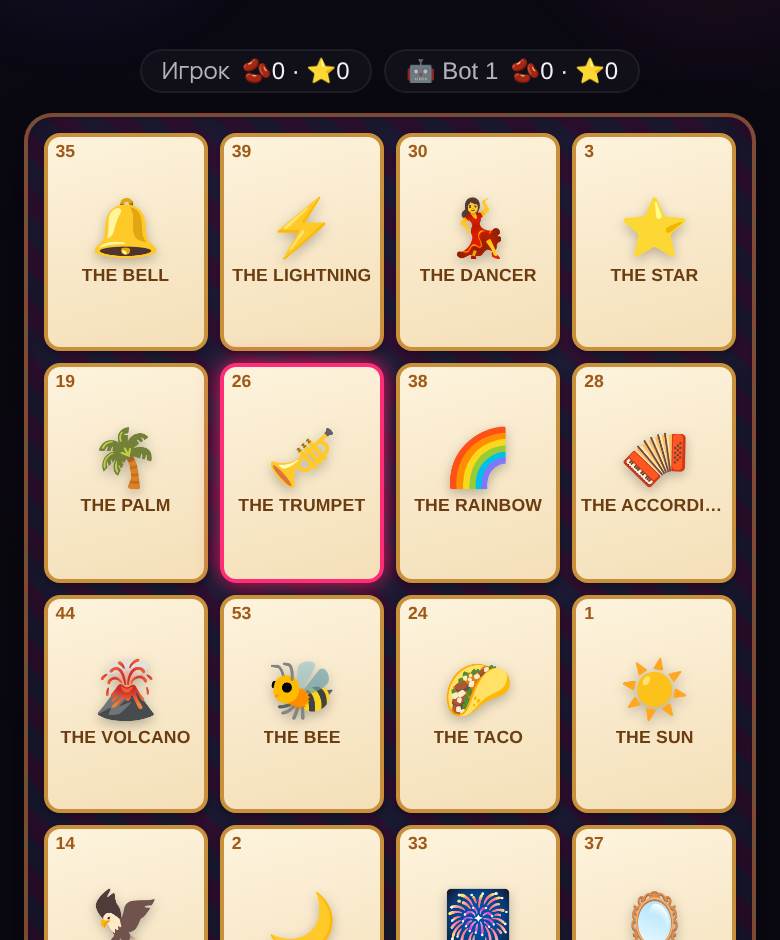
Lotería is Mexican picture bingo: each player has a 4×4 board of images, a caller announces cards one by one, and the first person to fill the board shouts «¡Lotería!». For a Spanish class that is close to ideal. Every call is a listening exercise — students hear el gallo or la sandía and have to connect the sound to a picture in a few seconds. Nobody has to speak in front of the class to participate, which is exactly what shy beginners need, and the shout at the end gives everyone a reason to pay attention to the very last card.
It also brings real culture into the room, not a textbook version of it. Lotería is played at family gatherings, school fairs and Día de Muertos all over Mexico and the US Southwest. Plenty of your heritage speakers will already know the cards and the caller rhymes — let them be the experts for a day.
Three ways to run it, depending on your room
Projector plus student devices
The setup most teachers end up using. Open a Lotería room on the classroom computer and choose to host without playing. The projector shows a join code and a QR code; students scan it on a Chromebook, tablet or phone, type a first name and land on their own board. No student accounts, no emails, nothing to install. A room holds up to 40 players, so a full class fits with room to spare.
Once you start, the projector shows the card being called, large enough to read from the back row, while each student marks their own board. You control the pace: pause when the class needs to repeat a word, replay the last card, or slow the calls down for beginners. The server checks every shout square by square, so there are no arguments about who really won.
Projector only, with paper boards
No devices, or a no-phones policy? Print the boards. The printable Lotería board generator makes 1 to 40 unique tablas on US Letter or A4 plus a caller sheet. You call from the sheet (or from the projector), students mark with beans, scraps of paper or a dry-erase marker on laminated boards. Laminate once, reuse all year.
Small groups or stations
Five students around one device, one of them acting as the caller and reading every card aloud in Spanish. This version gets the most speaking practice out of the game: the caller has to pronounce, the others have to listen. Rotate the caller each round.
Make a deck from your own vocabulary
The classic deck is great for culture, but the real classroom win is a custom deck. In the room settings you can type your own word list — la manzana, el perro, la escuela, rojo, azul — and add an emoji to each word if you want a picture. The game builds the boards from your list. A deck needs at least 24 words; 30 to 40 gives better variety.
Ideas that work well:
- Food and the café: la manzana, el pan, el queso, el agua, la leche, la sopa, el pollo…
- Animals: el gato, el perro, el caballo, la vaca, el pez, el pájaro…
- Colors and numbers: one word per card, emoji or a colored square as the picture.
- Verbs: show the picture, call the infinitive — correr, comer, dormir, nadar.
- Translation mode: the board shows the Spanish word, you call it in English (or the reverse, for older students).
- Holidays: a Día de Muertos or Navidad deck in October and December. Both come ready-made in the room (30 and 37 cards), so you only need a custom one for your own word list.
A 15-minute lesson plan
- Preview (3 min). Show 8–10 of the cards on the projector and say each word twice. Students repeat.
- Join (2 min). Students scan the QR and enter a first name. Put the join screen up as they walk in and this is done before the bell.
- Round one (4 min). Slow pace. Say every word out loud after the projector shows it.
- Round two (4 min). Normal pace, no repeating. Winner reads the cards on their board back to the class.
- Exit ticket (2 min). Each student writes three words from their board from memory.
Classroom management tips
- Ask for first names only — the lobby shows them on the projector.
- Short rounds keep attention. A 24-card deck fills boards in about two minutes.
- Use teams of two for younger kids: one marks, one listens. They talk to each other about the word, which is the point.
- If a student loses connection, they reopen the link and land back on the same board.
- False shouts cost nothing — the server just rejects them. It is a good, low-stakes moment to practice «¡Todavía no!».
Looking for the traditional card names and caller verses to teach alongside the game? They are all in the full Lotería cards list. The general rules, scoring and match settings are in how to play Lotería online.
FAQ
How many students can play Lotería online at once?
Up to 40 in one room, which covers a full class. The teacher can host from the projector without taking a board.
Do students need accounts or an app?
No. They open the link or scan the QR code, type a first name and play in the browser. Nothing to install, no email.
Can I use my own vocabulary list?
Yes. Type your word list into a custom deck (at least 24 words), optionally with an emoji for each. If you are logged in, you can save up to 20 decks to your account and reuse them next year.
Is Lotería appropriate for elementary school?
Yes. The classic deck is family-friendly and the game needs no reading if you use pictures. For the youngest kids, use a shorter deck and teams of two.
What if we do not have devices?
Print boards with the free generator and call from the caller sheet or the projector. It works exactly like the paper game.
🌵 Play Lotería right now
Against a bot, no sign-up — your first game in a couple of minutes
More about Lotería · Browse all 40 games · Online party games with friends