The explain-the-word party game: rules, tips and how to play online
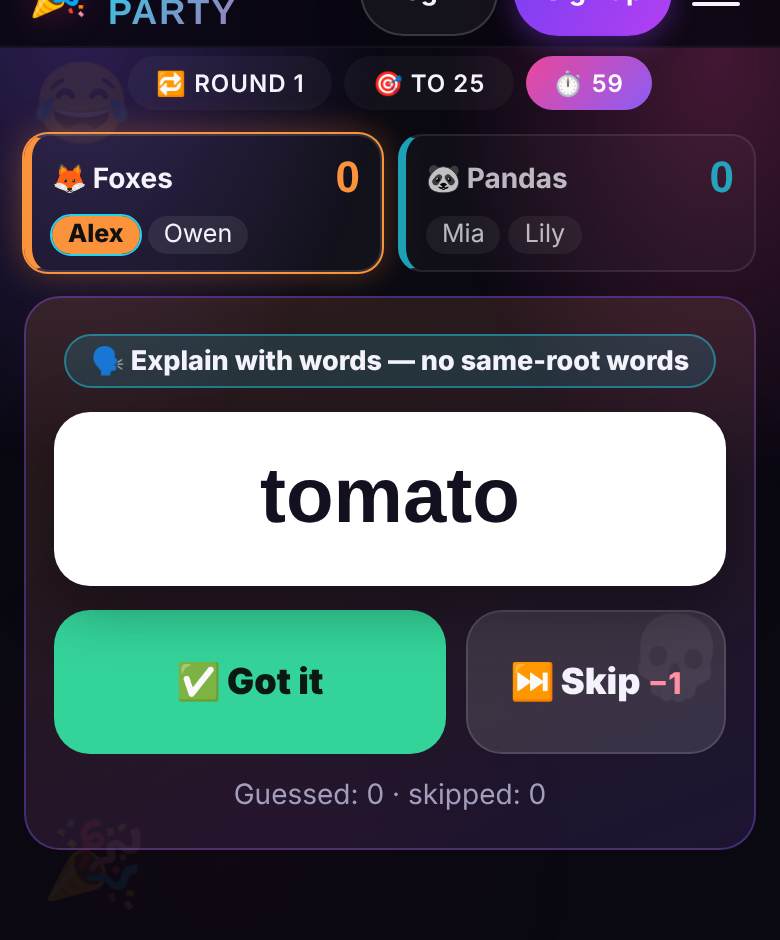
The explain-the-word game is simple: one player describes a word without saying it while their team races the clock to guess it; a guessed word scores a point, a skipped one costs you. Plenty of well-known board games work this way, and it is easy to play online: in Explain It! only the explainer sees the word on their phone, and the server keeps the timer and the score. Rules, modes and tips below.
Rules of the explain-the-word game
This is one of the oldest party games around: people know it from board games like Alias, from the Hat game (also called Fishbowl or Salad Bowl), where players write the words on slips of paper, and from charades, where you act things out in silence. The core is always the same:
- Split into teams — at least two teams of two.
- Teams take turns. On a turn, one player explains words and their teammates shout guesses.
- You cannot say the word itself, a word with the same root or a translation. In gestures mode you cannot speak at all.
- Each turn has a fixed time, usually 30–90 seconds. Explain as many words as you can.
- A guessed word scores a point. A skipped word costs a point, unless you agree to play without the penalty.
- Explainers rotate within each team, so everyone gets a go.
- The first team to the target score wins — or the leader after an agreed number of rounds.
Why the online version beats paper
The classic needs cards, a sand timer and somebody honest to keep score — and every night someone peeks at the deck, argues about the word that landed “on the buzzer” or forgets whose turn it is. Explain It! settles all that. Only the explainer sees the word, on their own phone. “✅ Got it” brings up the next word instantly, and so does “⏭ Skip”, minus a point. The timer is shared, and when the buzzer goes the explainer sees the list of words from the turn: fix an accidental tap and count the last word if the team got it in the final second.
The server runs the rotation: teams take turns, explainers rotate automatically, and every team always gets the same number of turns. The deck holds more than 350 family-friendly words per language at three difficulty levels, so you will not see repeats by round two.
Starting a game in two minutes
- The host creates an Explain It! room and sends friends the link or code. No installs, no accounts.
- Guests join from their phones and pick a team with the “Join” button. Can’t decide? The host taps “Shuffle”. Latecomers drop into the smallest team.
- In the lobby the host sets the number of teams (2–4), turn time (30, 60 or 90 seconds), how to explain, the win condition — first to 15, 25 or 40 points, or 2, 3 or 5 rounds — word difficulty and the skip penalty.
- Optionally, open the Big Screen on a TV: a big timer, the team scores and whose turn it is. The screen never shows the word.
- The explainer holds the phone so only they can see the word and taps “Go!” when the team is ready.
Three modes: words, gestures, mixed
- Words — the classic for a calm evening, a dinner or a video call. No same-root words.
- Gestures — the loud party version: the explainer stays silent and acts it out. Even the people who are not guessing end up crying with laughter.
- Mixed — each word decides for itself whether it is explained in words or gestures. The best mode once the group has warmed up.
How to explain faster
- Lead with the category. “It’s an animal”, “it’s food”, “it’s a job” narrows things down at once.
- Use opposites. “Not day, but…” beats a long description of night.
- Paint a situation. “What do people yell when someone scores?” lands faster than a dictionary definition.
- Do not get stuck. If a word is not coming after 10–15 seconds, skip it: a one-point penalty is cheaper than a wasted turn.
- Guessers, say everything. Wrong guesses tell the explainer which way to steer.
Variations for different groups
- Family night. Kids versus grown-ups, difficulty level one, skip penalty off. Little ones find gestures easier, so Mixed mode evens the odds.
- Office party. Mix departments with “Shuffle”. An hour over dinner: first to 40 points, 60 seconds per turn.
- Big loud party. Four teams, Gestures, 30-second turns — short turns keep the pace up.
To switch genres but keep the team spirit, try Pictioner, where you draw the word instead of explaining it. For a full office program built around the big screen, see our office party games guide.
Who it works for
You need four to sixteen players: from two pairs up to four teams of four. There are no bots — only real people explain and guess. The words are family-friendly, so it fits a birthday with kids and grandparents, an office party or a classroom. The deck comes in English, Russian, Spanish and Hebrew and follows the host’s interface language, which makes it a sneaky way for teenagers to practise a foreign language.
Want more word games for the night? In ¡Basta! everyone races to write words on one letter, and in Bluff Club you invent believable lies. For more ideas that run without a dedicated host, see our list of party games with no host.
FAQ
Can we play without a TV?
Yes. Everything you need is on the phones; the Big Screen just makes the timer and score easier for the whole room to see.
Does it work over a video call?
Yes. The explainer talks or acts into the camera, the team guesses on the call, and every phone shows the timer. Gestures mode works too.
What if the word was guessed on the buzzer?
When the turn ends, the explainer sees the word list and can count the last word with one tap. Same fix for an accidental tap.
How much does it cost?
Nothing: Explain It! is free for every player, and you join by link or code.
🗣️ Play Explain It! right now
Needs 4+ players — friends join by link or QR
More about Explain It! · Browse all 34 games · Online party games with friends