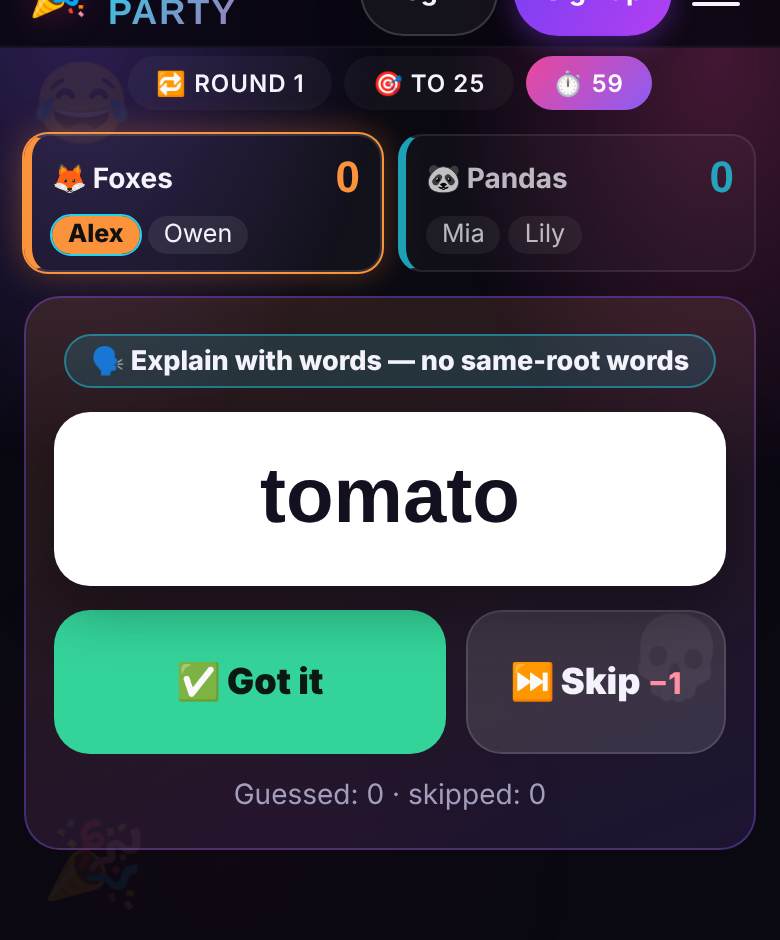
The explain-the-word game, now on your phones
Describing a word against the clock while your team yells guesses is a fixture of game nights, family reunions and classroom review days. Fishbowl (also called Salad Bowl) has everyone write words on slips of paper; charades makes you act them out without a sound; Taboo turned it into a box of cards with forbidden words and a buzzer.
Explain It! keeps the fast, loud core and drops the paperwork: only the explainer sees the word, on their own phone, and the server runs the timer, turn order and score.
How a game works
- Players split into 2–4 teams of at least two: one person explains, the rest guess.
- Teams take turns. The explainer taps “▶ Go!” and the timer starts: 30, 60 or 90 seconds.
- In Words mode, describe the word without saying it or a word from the same root; in Gestures mode, act it out silently.
- Teammates shout guesses. Correct? Tap “✅ Got it” for +1 and the next word. Stuck? “⏭ Skip” costs −1 if the penalty is on; scores can go below zero.
- When time runs out, the explainer gets 20 seconds to undo a mis-tap or count a last word guessed right at the buzzer.
- Explainers rotate inside each team, so everybody explains.
- A winner is checked only after a full circle, so all teams get equal turns: first to 15, 25 or 40 points, or the leader after 2, 3 or 5 circles. Tied leaders play up to three extra circles.
Edge cases and house rules are in our guide to the explain-the-word party game.
Play online free with friends
- Pick a nickname, choose Explain It! and create a room. No account, no app: it runs in the phone or laptop browser.
- Send friends the link or the 4-character room code (letters and digits). A room holds up to 16 people.
- Everyone picks a team with the “Join” button: Foxes, Pandas, Owls or Tigers. The host can hit “🔀 Shuffle”; latecomers land in the smallest team.
- You need at least four people. There are no bots: guessing happens out loud, so it is live players only, in person or over video chat.
- Everyone else sees a big countdown, who is explaining, words or gestures, and the count. The word stays hidden from both teams.
In a living room, the host opens 📺 Big Screen on a laptop hooked to the TV, or types playparty.live/tv and the room code on a smart TV: timer, team scores and whose turn, never the word. Dropped connection? Open the same link to get your seat back. New guests join between games; one rematch tap keeps the teams and adds newcomers.
Lobby settings
- Teams: 2, 3 or 4. Three teams need six players, four need eight.
- How to explain: 🗣 Words, 🙌 Gestures (pure charades) or 🎲 Mixed, where each word randomly gets one of the two.
- Turn time: 30, 60 or 90 seconds; one minute by default.
- Win condition: 15, 25 or 40 points, or 2, 3 or 5 circles.
- Difficulty: all words, Easy (cat, pizza), Medium (lighthouse, volcano, jobs) or Hard (friendship, echo, gravity).
- Skip penalty: −1 point, or no penalty.
The English deck has 354 family-friendly words (130 easy, 120 medium, 104 hard): no adult themes, alcohol, politics or real people. Words come in the site language of whoever created the room; Russian, Spanish and Hebrew decks exist too. You cannot add custom words, and there are no Fishbowl-style three rounds with the same slips: one mode is set for the whole game.
Tips to score more per turn
- Lead with the category. “An animal”, “a place”, “a feeling” cuts the field instantly.
- Skip early. Not landing in 10 seconds? Skip: one point is cheaper than half your turn.
- Use a situation. For “echo”: “you yell in a canyon and it yells back”.
- Let the other team referee. The game cannot hear you, so the waiting team watches for same-root words and sneaky whispers in Gestures mode.
Like guessing as a team? In Pictioner you draw the word instead, Cipher Words has a captain give one clue for several words, and Bluff Club rewards the most believable fake answer.