Guess the song from the first notes: hosting a music quiz with friends online
To play a guess-the-song game with friends online, open HitQuiz, pick a playlist and send your friends the room code: a hit plays for one second, then three, seven and fifteen, and everyone answers from their phone. The sooner you name it, the more you score. It works around one TV or over a video call, with the audio playing on every phone.
How the game works
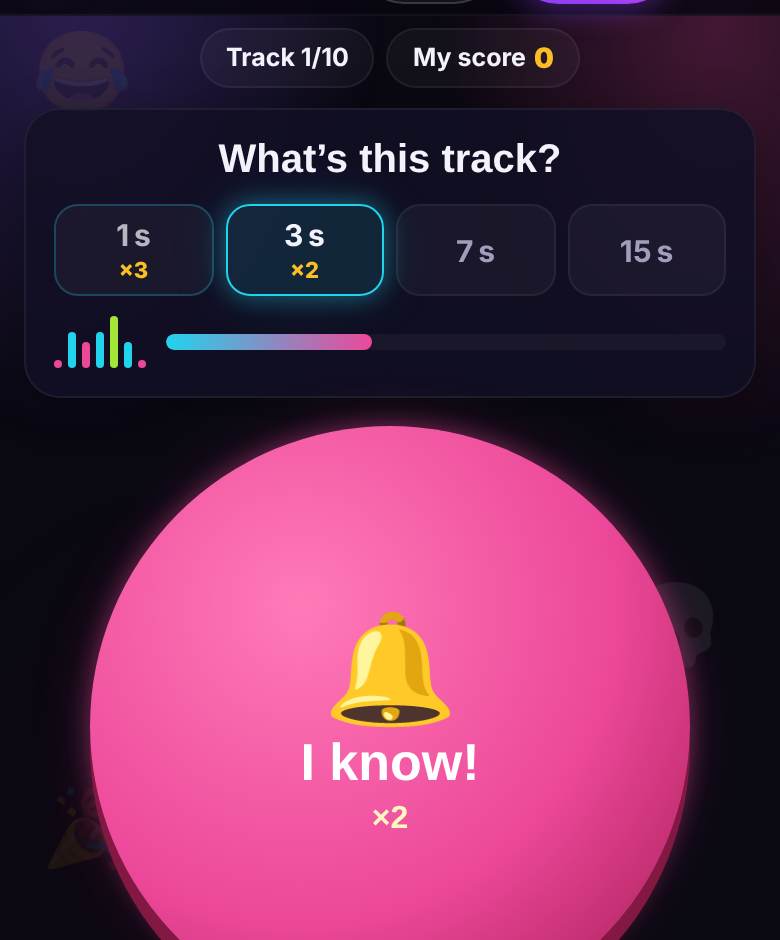
You probably know the format from TV game shows like Name That Tune: a sliver of a song plays and you race to name it. HitQuiz has its own twist. The host starts a track and the snippet lasts just one second. Nobody got it? The host taps “More notes” and the snippet grows to three seconds, then seven, then fifteen. After the reveal, the screen shows the cover, artist, title and year, and only then the video.
Points come separately for the artist and the title, one each. The key is the speed multiplier: an answer in the first second is worth three times as much, in the third second twice as much. Name both artist and song after one second and you bank 6 points; the same two answers at fifteen seconds earn just 2. A bold guess on the first note often beats playing it safe.
Two ways to answer
In the lobby the host picks how guests answer. That choice shapes the whole night.
- “I know!” buzzer. Guests hit the button on their phones and a queue forms on the host’s screen. The first player says artist and title out loud, and the host marks ✅ (all correct), ½ (half right) or ❌. Miss and you are out for that track; the floor passes on. Best for one room: loud, competitive, full of shouting.
- Quick typing. Guests type the artist and title in two fields and checking is automatic: it forgives typos, transliteration and swapped fields. Three attempts per track. Best for video calls and bigger groups, where the host cannot judge everyone.
Where the music comes from
HitQuiz uses the same packs as HitLoto music bingo: free starter packs, your own playlists and a “Theme mix” of two to six packs blended in equal shares. Your own playlist is a YouTube playlist link or a typed list of songs; you create it in the HitLoto lobby, and it then shows up among your packs in HitQuiz. A game runs 10, 15 or 20 tracks — you choose in the lobby.
One important detail: before the reveal, only a 30-second Apple Music or Deezer audio preview plays — never the YouTube video, because the video shows the title. So a track needs that preview to be playable, and the lobby shows how many tracks from your list will play. A track without one is replaced by a spare from the same pack, and the host can also tap “Swap track”.
Playing with friends over a video call
- The host creates a HitQuiz room, picks the music and chooses “Quick typing”.
- Turn on “Sound on guests’ phones” — the snippet plays on every phone instead of through the call’s mic, where music turns to mush.
- Drop the link or room code in the call chat. Guests join from their phone browsers, nothing to install.
- Each guest taps the “host turned on sound” banner once — browsers only allow audio after a tap.
- The call carries the voices, the laughter and the “that was SO obvious!” arguments. More ideas in our video call games list.
Playing in one room
At home it is even simpler. On the TV, open playparty.live/tv and type the 4-character room code; the big screen shows the track number, the step timer, the leaderboard and the reveal. Tap the screen once so the browser allows sound. No TV? Audio can play straight from the host’s phone. Guests join by scanning the QR on the big screen. The buzzer shines here: live shouting and a host playing judge give you that game-show feeling.
Theme night ideas
- Decades. Four short 10-track games: the ’80s, ’90s, 2000s and 2010s. Each winner is crowned king or queen of the era.
- Soundtracks. A playlist of movie and TV songs — naming them from one second is brutally hard and very funny.
- The birthday playlist. Build it from the guest of honour’s favourites and find out who knows them best.
- Generations mix. Parents’ and kids’ packs in one “Theme mix” — a family night where the kids discover what the grown-ups used to play.
Tips for the host
- Open with the big hits. Make the first three or four tracks songs everyone knows, so every guest scores at least once.
- Do not rush “More notes”. Give the room a couple of seconds after each step — the funniest guesses happen in the pause.
- Judge generously. On the buzzer, a ½ for the right artist keeps the chorus-only fans in the game.
- Reveal with the video. After “Reveal”, play the clip on the big screen: thirty seconds of singing along between tracks makes the night.
Every console button is explained in the HitQuiz host guide.
HitQuiz or music bingo?
Both are music games for the same TV, but they make different nights. HitQuiz is a contest for music nerds: whoever names it first wins, and a 10-track game takes about fifteen minutes. Music bingo is for everyone: you can mark your ticket without recognising a single song, and luck plays its part. For a mixed crowd, open with bingo using our plan and save HitQuiz for dessert. If the group wants to sing afterwards, move on to a karaoke battle.
FAQ
Is it free?
Yes, for up to 5 guests in a room with the free starter packs. More seats and premium packs come with an S/M/L night pass, shared with music bingo and karaoke.
Why is a track silent?
It has no 30-second preview. Tap “Swap track” and a spare from the same pack takes its place.
A correct answer was not counted
In quick typing, the host can tap the answer in the list to accept it manually, scored at the second when the guest answered.
How long does a game take?
About 15 minutes for 10 tracks and roughly half an hour for 20. After the results, “New game” starts in the same room.
🎧 Play HitQuiz right now
You host, guests join from their phones by QR
More about HitQuiz · Browse all 34 games · Online party games with friends