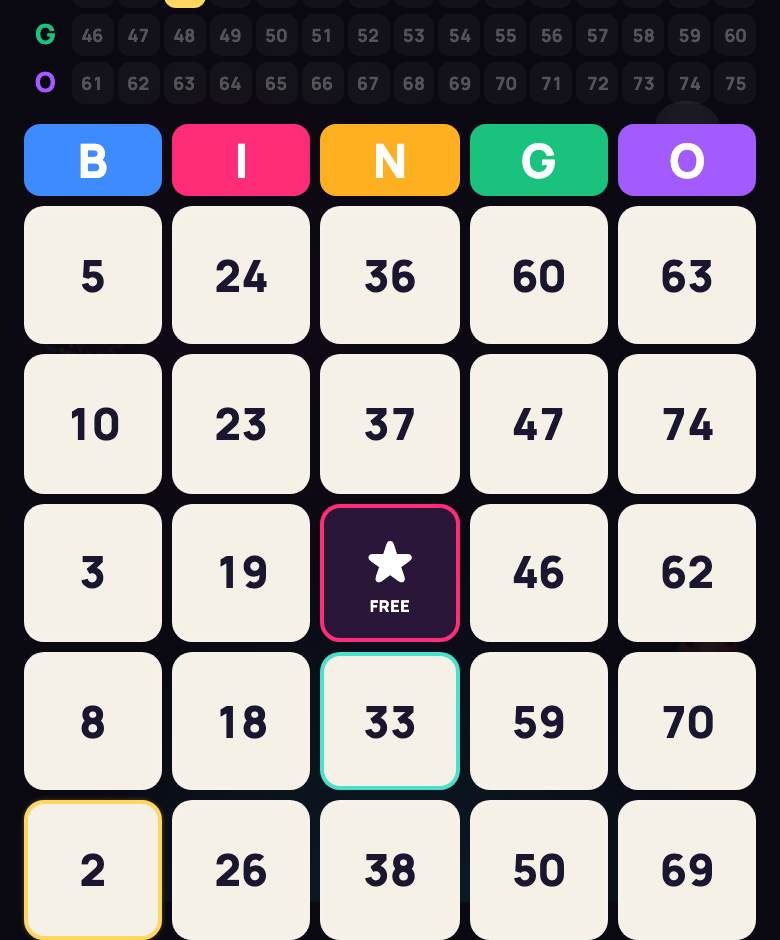
Virtual bingo that actually plays itself
Printable card generators are great until game day: you print thirty cards, cut them up and scribble numbers on the whiteboard. Here the bingo caller is the server. You open a room, players join from their phones, and balls are drawn at the pace you choose, read aloud, and shown on a big board for the projector.
That’s our edge: a live game, not a PDF. The server deals unique cards, draws the balls and checks every BINGO! against the numbers actually called, so nobody marks a number that hasn’t come up. And if your students don’t have devices, you can still run classic paper cards with the screen doing the calling.
75-ball or 90-ball: pick your bingo
US classrooms and party hosts usually go with 75-ball; UK players will feel at home with the 90-ball ticket.
| 75-ball (American) | 90-ball (UK/European) | |
|---|---|---|
| Card | 5×5 grid, FREE square in the center | 3×9 ticket, 15 numbers, 5 per row |
| Numbers | B 1–15, I 16–30, N 31–45, G 46–60, O 61–75 | column 1 has 1–9, column 2 has 10–19 … last column 80–90 |
| Patterns | line (any row, column or either diagonal), four corners, full card (blackout) | one line, two lines, full house |
You can only mark a number after it’s called. Complete the pattern and press BINGO! — the server checks it using called numbers only. A false call shows a “false call” message and locks the button for 3 seconds, with no other penalty. A valid BINGO wins the round; if every ball is drawn without one, that round has no winner.
Virtual bingo for the classroom, step by step
The first and most prominent lobby option is your role. 🎙️ Caller only: you have no card and just run the game — made for a classroom or party projector, and you can start before anyone joins. 🎟️ I play too: you get a card like everyone else, but you need at least 2 players (bots count).
- Create a Bingo room, choose 🎙️ Caller only, the mode, the pattern and the ball pace.
- Click “📺 Big Screen” in the lobby, or on the classroom TV or projector go to playparty.live/tv and type the 4-character room code.
- Students open the link or enter the code on a phone or laptop. No accounts, no app install, free, and up to 40 players per room.
- Latecomers can join after the game has started and get a card right away.
- Hit start. The first ball drops about 2.5 seconds later, and numbers are read aloud by the browser’s built-in speech — voice is on by default for the caller.
The Big Screen shows a huge last ball (with its letter in 75-ball), a progress bar to the next ball, the previous five balls, the full board, who is one number away, a BINGO! stamp with the winner’s name and the final podium. Players’ cards are never shown on the big screen.
Running bingo with paper cards
No devices? In caller-only mode the host console has “📝 BINGO on a paper card”: type the student’s name or card number, confirm, and the round ends with that winner on screen. You check paper cards yourself against the board — the server can only verify phone cards.
Bingo online with friends
For a game night, pick 🎟️ I play too, start a video call and drop the link in the chat. Short on people? Add bots in the lobby. They mark automatically and shout BINGO! 1–3 seconds after completing the pattern, so a sharp human can still beat them.
- Auto-mark is a personal toggle that marks called numbers for you. You still have to press BINGO! yourself.
- Player chips show everyone’s wins and an “N to go” hint when they’re close.
- The number board highlights every called number and makes the latest one glow. Players can expand it.
- Dropped out? Reopen the game in the same browser to get the same seat and the same card.
Host settings and console
- Ball pace: manual (you tap “Next ball”) or automatic every 4, 6, 8 or 12 seconds, 6 by default. Pause, resume or change the pace mid-game.
- Console: Next ball, Pause/Resume, pace buttons and a 🔊 Voice toggle.
- Pattern and the default auto-mark setting for players.
- Wins for the match: 1, 2, 3 or 5 — 1 the first time you host, 2 after that.
The next round starts about 6 seconds after a winner, with brand-new cards. The match ends when someone reaches the chosen number of wins, or when the host ends it; a rematch keeps the room together. The interface speaks English, Spanish, Russian and Hebrew.
Tips for teachers and party hosts
- Use four corners for a five-minute warm-up and full card for a long game before a break.
- Manual pace gives you time to talk between balls: “What’s ten more?”, “Odd or even?”.
- Younger kids can practice reading two-digit numbers: have the class say the number before the board confirms it.
- With 90-ball, each ticket column is one group of tens — a handy place-value visual.
- Want a change of pace? Try HitLoto music bingo, picture-based Lotería or the group trivia game Quiz Ladder.