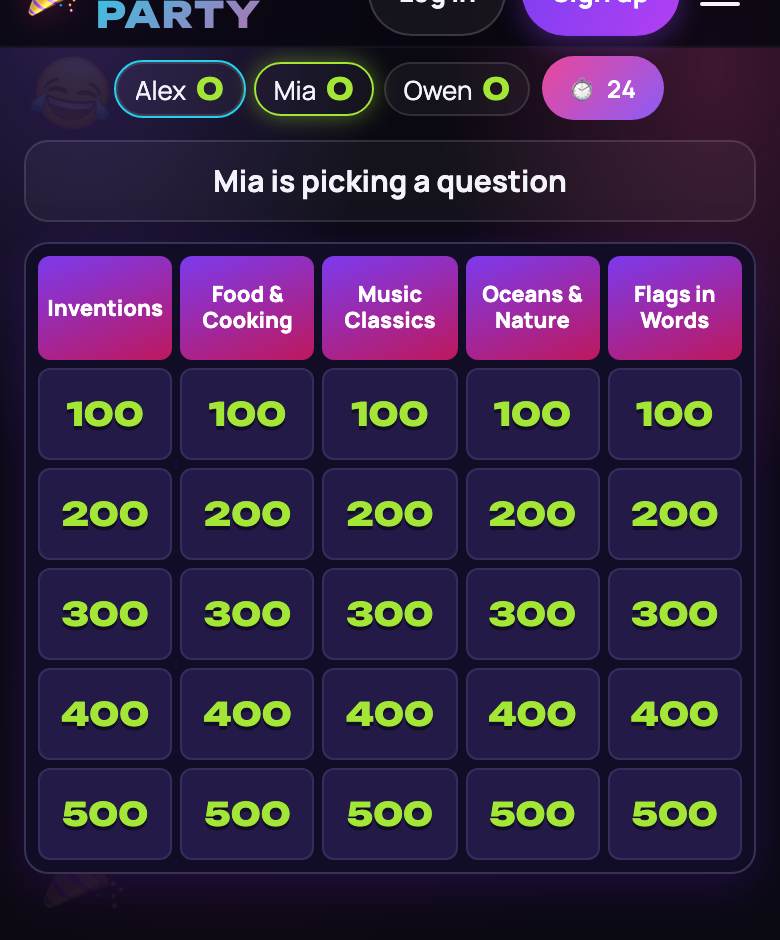
What Quiz Board is
A trivia board is the format everyone knows from TV game shows: a grid of categories and point values, someone picks a square, and whoever buzzes first answers. Classrooms, office parties and bar trivia nights all run it. Quiz Board puts it in a browser: the TV shows the board and every phone becomes a buzzer with four answer options. The server, not an argument, decides who buzzed first.
How a round works
- The board has 5 categories of 5 questions worth 100 to 500 points; higher is harder. A random draw picks who goes first.
- The picker opens a square. The question and four options appear on the TV and every phone.
- While it is read (2.5–7 seconds) the buzzer is closed; press early and you are locked out for a second.
- Then a 12-second buzzer race. The first press to reach the server answers, with 10 seconds to choose.
- Right: you score the value and pick next. Wrong or too slow: you lose the value, your option is crossed out and the others get 8 more seconds. If nobody answers, the answer is shown.
- Round 2 doubles every value (200–1000) and last place picks first. A final with bets follows; highest score wins.
Special squares and the final
Each round hides two special squares, never in the 100 row.
- 🎲 High Stakes. You see the category, not the question, then bet from the round’s lowest value up to your score (or the round’s top value if you have less) and answer alone.
- 🎁 Pass It On. You hand the question to a rival or another team; only they answer, for plus or minus the value.
- ★ Final. Everyone above zero sees the topic, places a secret bet up to their score and locks in a secret answer. All are revealed at once.
Play online with friends, coworkers or a class
Create a room to get a link and a four-character code (letters and digits). Guests open it on a phone or laptop, type a nickname and they are in. No account, no download, free.
- You need 2 to 12 live players. No bots — a buzzer race only works between humans.
- Big Screen: the host clicks “📺 Open the screen” on a laptop connected to the TV, or opens playparty.live/tv on a smart TV and enters the code. The answer appears only at the reveal.
- Nobody new joins mid-game, but if someone’s Wi-Fi drops, they reopen the link and get their seat back.
- Two rounds take about half an hour; the host can then start a rematch.
Lobby settings
- Solo or 2–4 teams. Players hit “Join” on a team; the host can shuffle. Any teammate can buzz, but one miss knocks the whole team out of that question.
- One or two rounds; the final and the special squares can each be turned off.
- “Only hosts”. The host is off the scoreboard, opens squares for the picker and can reveal the answer early with “⏭ Reveal answer / next”.
Write your own questions
The built-in English bank has 27 categories, from US Landmarks to Spelling & Grammar, plus 12 finals; each game draws five random categories per round, in the host’s site language. For a classroom review or a team offsite, open “✏️ Custom board”: up to two rounds of 6 categories with 5 questions each (question, right answer, three wrong ones) and an optional final. Empty squares are skipped, so one category is enough.
The board stays on the server, so guests can’t peek. Your draft lives in your browser; “📤 Export JSON” saves a file and “📥 Import JSON” brings it back next semester. For timing and team sizes, see how to host a trivia night at work.
Tips to win
- Start cheap in your best category — the 100 row is safe, and you keep control of the board.
- Don’t buzz on a hunch. A miss costs what a hit earns. Unsure on a 500? Let a rival guess first; a wrong option gets crossed out.
- Do the math in the final. As leader, bet enough that a right answer beats second place doubling up; lead by more than double and bet zero.
More quizzes: HitQuiz (name that tune), Bluff Club (fake answers to real facts) and the team word game Explain It!.